How I build areas with a good source map
So what size height map do I need to use to fill the whole map and non-walkable portions for a 24x24? 12x12 and 32x32 don't concern me as we are building the whole city in 24x24 tiles... I want YATT to fill in the border areas and not just the walkable part. Once I get this figured out I'll start pumping out templates of the surface.
Somewhere around 200x200 I'd guess would give you a full 24x24. Experiment a little.
Aelred, the statues are an experiment which is only 75% successful. I've got 4 NPCs, all trying to run to a waypoint after they spawn (using a single scripted waypoint), located in the middle of the raised stone platform. That, btw, is just terrian with a stone texture....the flatten tool lets youbuild almost symetrically.
Anyway, they run for the waypoint, not walk, and upon doing so, enter a trigger which surrounds the waypoint. The aerial screenshot shows all this. The trigger performs various tasks. It petrifies them, it gives them the stoneskin vfx, and it hopefully does those things while they are in mid flight.
That's important if you don't want a statue simply standing in default position. Obviously simpler ways ought to exist to get an NPC to animate before casting them in stone, but I cannot for some reason successfully delay the petrify effect. As such, running for the wayoint achieves a degree of animation.
The downside is that the positions are random. Canon provides a way of exlaining this which is why I've included it. cipher may choose to modify or remove it of course. But the statue is supposed to have a stone flying griffon which actually flies through the air. Given that I've rationalised that the statue is magically enhanced, changing positions each day.
The other downside is that the blue and red highlight of friend/foe remains. So it's a long way from ideal.
Aelred, the statues are an experiment which is only 75% successful. I've got 4 NPCs, all trying to run to a waypoint after they spawn (using a single scripted waypoint), located in the middle of the raised stone platform. That, btw, is just terrian with a stone texture....the flatten tool lets youbuild almost symetrically.
Anyway, they run for the waypoint, not walk, and upon doing so, enter a trigger which surrounds the waypoint. The aerial screenshot shows all this. The trigger performs various tasks. It petrifies them, it gives them the stoneskin vfx, and it hopefully does those things while they are in mid flight.
That's important if you don't want a statue simply standing in default position. Obviously simpler ways ought to exist to get an NPC to animate before casting them in stone, but I cannot for some reason successfully delay the petrify effect. As such, running for the wayoint achieves a degree of animation.
The downside is that the positions are random. Canon provides a way of exlaining this which is why I've included it. cipher may choose to modify or remove it of course. But the statue is supposed to have a stone flying griffon which actually flies through the air. Given that I've rationalised that the statue is magically enhanced, changing positions each day.
The other downside is that the blue and red highlight of friend/foe remains. So it's a long way from ideal.

Indio - that is really cool! So I take it that you could make static postures more easily (placing an effect that will go off ingame to petrify ? Can you then move the petrified NPC within the toolset?)
HEEGZ - there is a YATT toolset grid ratio guide here:
http://nwn2yatt.sourceforge.net/
241x241 pixels will fill a 24X24 area.
I already did area X3, Y8 (Castle District - the area the Spires of Morning is in) I just unticked everything on the map except terrain and topography lines? And then with paint I colored each 100 feet with gradations of gray - the darker the lower - so the ocean was black and the highest part of Mount WD white. I think the highest part of the mountain is 1100 feet = 335 meters. Incredibly high! I also noticed that in the terrain screen the eyedropper has a max height of 100 meters...anything above that you can't use the eyedropper to get/know the exact height. This comes into play when you want to use the flatten tool - maximum setting is 100 meters so there is no way to use it on the higher parts of mount WD.
Are you working on the mountain? Let's collaborate - I started with the grid square on the north tip of the mountain (X3, Y8 ) and the south tip (X?, Y?).
I used only paint for the initial experiments so the heights were terraced and I had to smooth them out. This is because paint doesnt have a smoothing or blending effect for the gradations of colors. And I dont have photoshop.
If you (or indio) have the ability to blend out the colors then I suppose YATT would make smooth rises on the mountain and that would save aLOT of work on the walkmesh. I could work on the basic greyscale maps tonight and pass them to you to smooth out the color.
Ive already created an overlay grid with the toolset grid and I've been making individual maps of each area as a guide. I'll post a couple when I get home from work and ask you guys if you think it is worthwhile to go ahead and do them all.
HEEGZ - there is a YATT toolset grid ratio guide here:
http://nwn2yatt.sourceforge.net/
241x241 pixels will fill a 24X24 area.
I already did area X3, Y8 (Castle District - the area the Spires of Morning is in) I just unticked everything on the map except terrain and topography lines? And then with paint I colored each 100 feet with gradations of gray - the darker the lower - so the ocean was black and the highest part of Mount WD white. I think the highest part of the mountain is 1100 feet = 335 meters. Incredibly high! I also noticed that in the terrain screen the eyedropper has a max height of 100 meters...anything above that you can't use the eyedropper to get/know the exact height. This comes into play when you want to use the flatten tool - maximum setting is 100 meters so there is no way to use it on the higher parts of mount WD.
Are you working on the mountain? Let's collaborate - I started with the grid square on the north tip of the mountain (X3, Y8 ) and the south tip (X?, Y?).
I used only paint for the initial experiments so the heights were terraced and I had to smooth them out. This is because paint doesnt have a smoothing or blending effect for the gradations of colors. And I dont have photoshop.
If you (or indio) have the ability to blend out the colors then I suppose YATT would make smooth rises on the mountain and that would save aLOT of work on the walkmesh. I could work on the basic greyscale maps tonight and pass them to you to smooth out the color.
Ive already created an overlay grid with the toolset grid and I've been making individual maps of each area as a guide. I'll post a couple when I get home from work and ask you guys if you think it is worthwhile to go ahead and do them all.
Well the easiest way is to simply include the petrify and stoneskin sfx in the NPCs onspawn. When they spawn in, they are immediately made a statue.
The trick in my opinion is to get them moving/attacking in some way before feezing them. If I could delay the petrify I could get any animation to work. A victory effect, or worship, knockdown, frightened, all would work to great effect.
The trick in my opinion is to get them moving/attacking in some way before feezing them. If I could delay the petrify I could get any animation to work. A victory effect, or worship, knockdown, frightened, all would work to great effect.
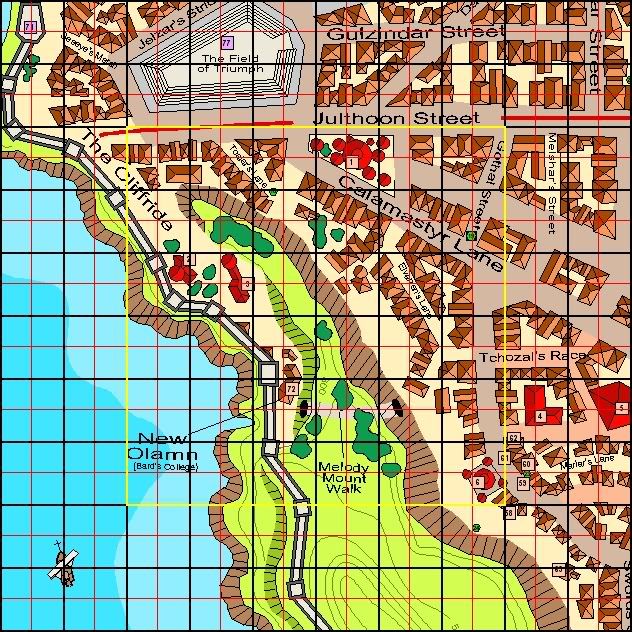
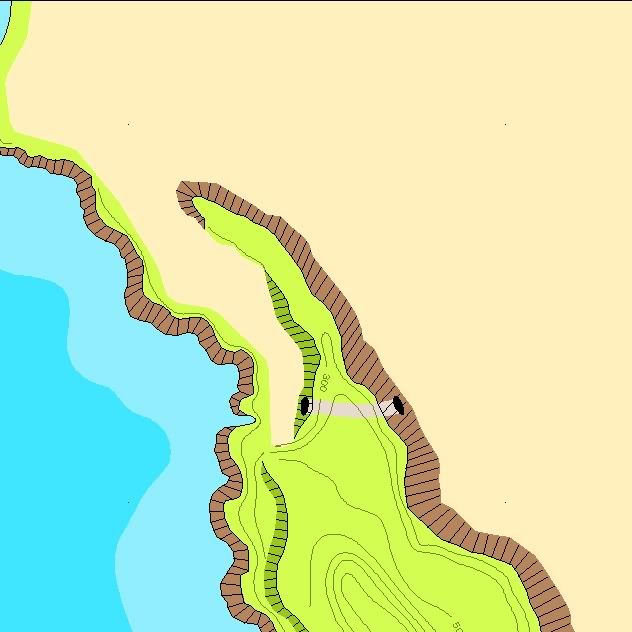
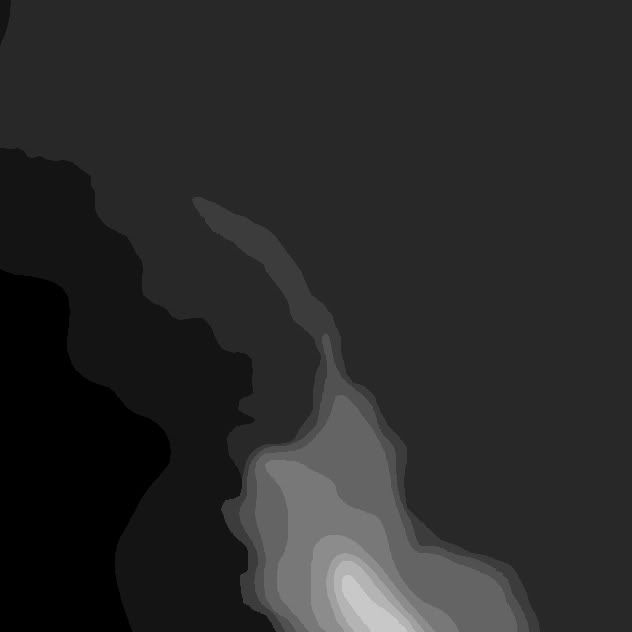
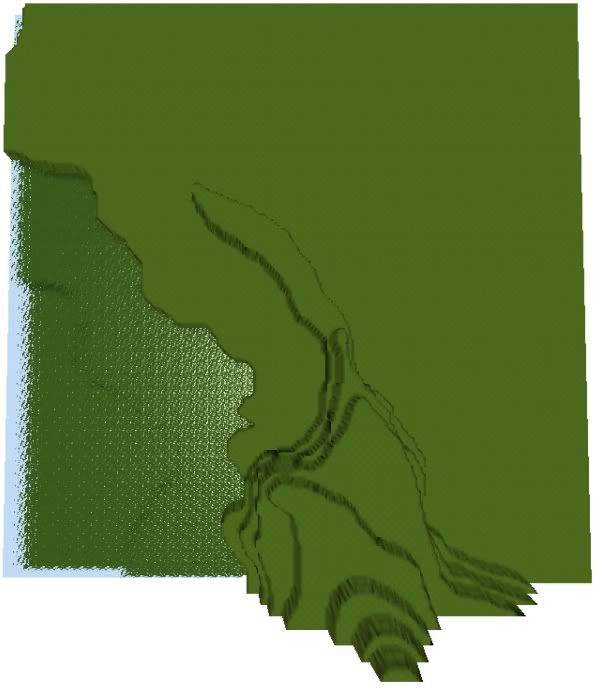
we really need to use the same maps for making the YATT height maps. Either the 3ed that idio used (which basically laid out the roads for us) or the FRIA map. I have around 7-8 other maps as well. However given the fact that the heightmap only needs to be 241x241 I think the 3ed will be the easiest to use. Not to mention that it is also easily obtainable in pdf format and imported into photoshop.
-
ç i p h é r

- Retired
- Posts: 2904
- Joined: Fri Oct 21, 2005 4:12 pm
- Location: US Central (GMT - 6)
Indio, did you try stacking the effects in the creature's action queue? You should be able to do that and it will guarantee the proper sequence.
On a side note, are you using the ACR VFX system to do this or using custom, user defined scripts? While the effect options for the VFX system are noted under placeables in the Wiki, they also (secretly) work with creatures and triggers too. It works entirely by setting local variables on objects FWIW.
Aelred, I see what you mean about the plateaus on the mountain. Smoothing them out to various degrees by blending the colors would no doubt make it look more realistic. Since you are a paint user, allow me suggest a free alternative to photoshop that I think you will find really easy to use and vastly more powerful than the basic paint tool:
http://getpaint.net/index2.html
Hopefully you can master YATT with it. Oh and BTW, does it really matter which maps YATT uses - 3rd ed or FRIA? The building placement should be exactly the same and the heightmapping is all handled externally, so it may not appear ideal, but I'm not sure it's a problem either.
On a side note, are you using the ACR VFX system to do this or using custom, user defined scripts? While the effect options for the VFX system are noted under placeables in the Wiki, they also (secretly) work with creatures and triggers too. It works entirely by setting local variables on objects FWIW.
Aelred, I see what you mean about the plateaus on the mountain. Smoothing them out to various degrees by blending the colors would no doubt make it look more realistic. Since you are a paint user, allow me suggest a free alternative to photoshop that I think you will find really easy to use and vastly more powerful than the basic paint tool:
http://getpaint.net/index2.html
Hopefully you can master YATT with it. Oh and BTW, does it really matter which maps YATT uses - 3rd ed or FRIA? The building placement should be exactly the same and the heightmapping is all handled externally, so it may not appear ideal, but I'm not sure it's a problem either.
The topography lines on Mt WD are much clearer in the FRIA map than in any of the other maps I've seen.
We don't really need to use YATT for the city - which is flat. I suppose you could use it to lower the roads slightly and raise the areas where there are buildings slightly. YATT will help alot with the mountain though and for sculpting the harbour to make it nice and inviting for future generations of aquatic elves...hehehe.
Ill check out the program Cipher - thanks man.
We don't really need to use YATT for the city - which is flat. I suppose you could use it to lower the roads slightly and raise the areas where there are buildings slightly. YATT will help alot with the mountain though and for sculpting the harbour to make it nice and inviting for future generations of aquatic elves...hehehe.
Ill check out the program Cipher - thanks man.
-
ç i p h é r
- Retired
- Posts: 2904
- Joined: Fri Oct 21, 2005 4:12 pm
- Location: US Central (GMT - 6)
I'd like to see what it does for roads. It'd take about 1 minute with the smudge tool in photoshop to mixup the levels of gray along the road. If that works, heck that'll save time. Also, I've been adding a slight slope from the beach up toward the mountain to give people the sense they're heading toward high ground. The city is effectively flat, but I can't imagine that it's perfectly flat, certainly not at the foot of a mountain. Just the way I envision it.
Interesting options. I'll check them out.ç i p h é r wrote:Indio, did you try stacking the effects in the creature's action queue? You should be able to do that and it will guarantee the proper sequence.
On a side note, are you using the ACR VFX system to do this or using custom, user defined scripts? While the effect options for the VFX system are noted under placeables in the Wiki, they also (secretly) work with creatures and triggers too. It works entirely by setting local variables on objects FWIW.
I've completed one area (as much as I intend to at least) and will have the other finished by tommorow. I'll post them both tomorrow night my time.
The package as it stands consists of 2 exterior areas, 4 NPC statues, 2 scripts (1x scripted waypoint for the statues and 1 OnEnter for the statues), and that's about it.
I appreciate that I'm not doing much other than the absolute minimum for areas here (layout, walkmesh, base textures, placeables, trees and grass only), but I've got TSF to work on. I like this forum though. It's the first forum I've felt like I can actually share trade secrets in a long time.
So barring any unforseen delays cipher, I'll PM you the download details and you can do with the areas as you will. Thanks again for taking me on board. You can remove me at your leisure mate.
-
ç i p h é r
- Retired
- Posts: 2904
- Joined: Fri Oct 21, 2005 4:12 pm
- Location: US Central (GMT - 6)
Thanks for everything Indio. Blasting through 2 areas like you have is really a testament to your building talent - your reputation is well deserved.
Hopefully, we can all reunite once more to work on TSF or Myth Drannor or another project. I have to say, I really enjoy this level of participation on a team. It's what's been missing from the get go, and what I was seeking when I joined ALFA.
Hopefully, we can all reunite once more to work on TSF or Myth Drannor or another project. I have to say, I really enjoy this level of participation on a team. It's what's been missing from the get go, and what I was seeking when I joined ALFA.
-
MorbidKate
- Dungeon Master
- Posts: 1627
- Joined: Thu Aug 12, 2004 10:45 pm
- Location: GMT -5 (EST)
This stuff is bloody awesome!!!!
Got a question though. I've got the height map thing down pat now with Paint.net and can get it in with YATT so I'm happy but I'd like my area to just fill the useable space of a 32x32 area. Right now is fills the whole area. Is it the size of bitmap, a scale setting within YATT or something else??
TIA
Kate
PS I just want to say that this new Toolsetting forum has helped me learn stuff in a fraction of the time it was taking before and with a hell of lot less stress and frustration involved. Please keep it coming.
Got a question though. I've got the height map thing down pat now with Paint.net and can get it in with YATT so I'm happy but I'd like my area to just fill the useable space of a 32x32 area. Right now is fills the whole area. Is it the size of bitmap, a scale setting within YATT or something else??
TIA
Kate
PS I just want to say that this new Toolsetting forum has helped me learn stuff in a fraction of the time it was taking before and with a hell of lot less stress and frustration involved. Please keep it coming.
"We had gone in search of the American dream. It had been a lame f*ckaround. A waste of time. There was no point in looking back. F*ck no, not today thank you kindly. My heart was filled with joy. I felt like a monster reincarnation of Horatio Alger. A man on the move... and just sick enough to be totally confident." -- Raoul Duke.
Hi MK - A bitmap heightmap for a 32x32 area should be 289x289 pixels.
The chart for sizing is here:
http://nwn2yatt.sourceforge.net/
I'm glad to see the forum has helped someone.
Please feel free to post any questions at all that you come up with too.
Aelred
The chart for sizing is here:
http://nwn2yatt.sourceforge.net/
I'm glad to see the forum has helped someone.
Please feel free to post any questions at all that you come up with too.
Aelred